Repo Board

Every git repoon your machine,on one board.

Repo Board finds every repository on your disk and shows which ones have uncommitted work, commits to pull or push, or conflicts, without opening a single one. Free, for Windows, macOS, Linux and VS Code.

See which repos have uncommitted work, commits to pull or push, or conflicts. Free for Windows, macOS, Linux and VS Code.

A demo board. Pick a chip to filter it, the way you do in the app.

You know the routine.

You cd around to remember which repo has uncommitted work. You forget to pull before you start. You scroll through your editor's recent list hoping the project is still there.

Repo Board replaces all of that with one window.

~/code $ cd payments-api && git status
On branch main. Your branch is behind by 4 commits.
~/code/payments-api $ cd ../checkout-web && git status
Changes not staged for commit: 7 files
~/code/checkout-web $ cd ../storefront && git status
~/code/storefront $ cd ../tiny-router && git status
Unmerged paths: 2 files
~/code/tiny-router $ cd ../…

One look tells you where you're needed.

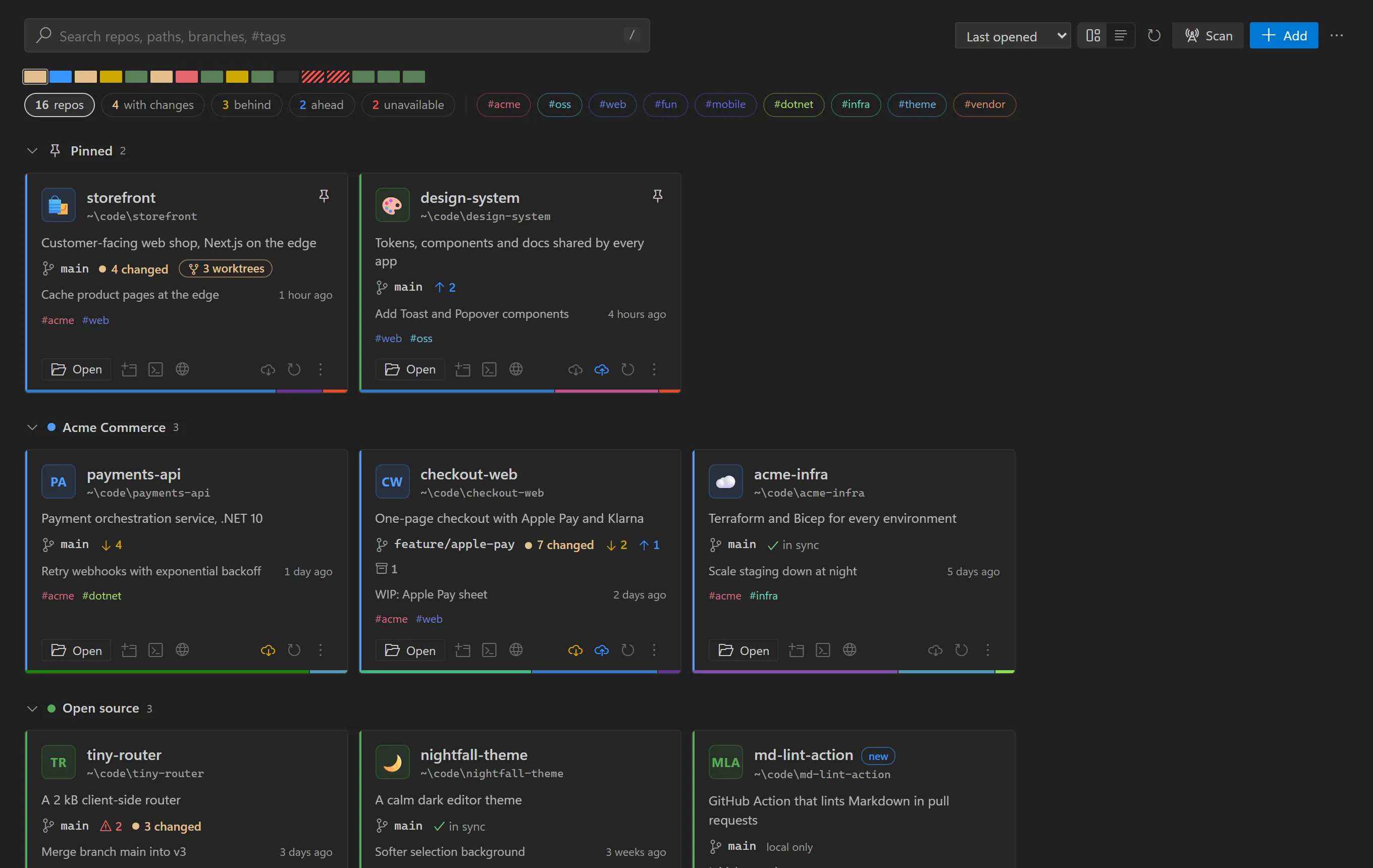
Every repo gets a tile with its branch, ahead and behind counts, changed files, stashes and last commit. The strip at the top has one cell per repo, coloured by git state.

Repo Board showing pinned repos, collections, filter chips and the git state of every repo
  • Uncommitted changes
  • Behind: something to pull
  • Ahead: something to push
  • Merge conflicts
  • Clean and in sync
  • Folder or drive missing

Features

It finds your repos for you.

Point it at C:\code or ~/src once. Every repository underneath appears, and new clones show up by themselves.

It stops at each .git, never follows symlinks or junctions, and skips node_modulesand friends. Repos you remove stay removed.

~/code
├─ payments-api/        added
├─ checkout-web/        added
├─ clients/
│  ├─ acme-portal/      added
│  └─ node_modules/     skipped
├─ storefront/          added
└─ notes.txt
Filter to what needs you right now.

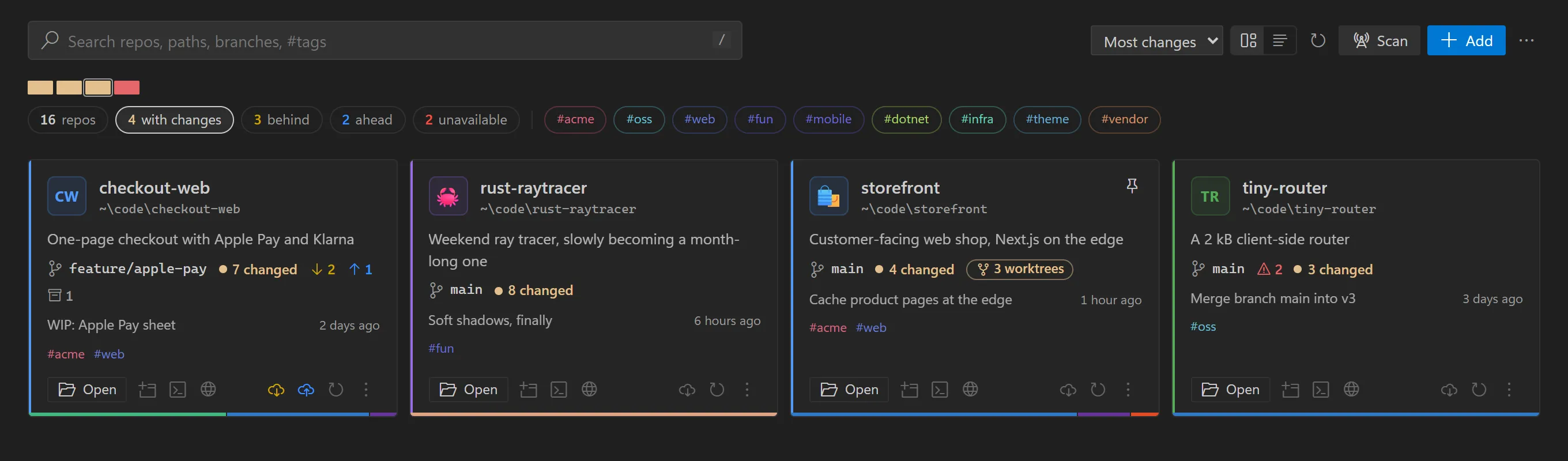
Click with changes, behind, ahead orunavailable and the board narrows down. Sort by most changes and the repos that need you come first.

Status comes from a single git status --porcelain=v2 per repo, and the board shows instantly from cache while fresh status streams in.

Repos with uncommitted changes, sorted by most changes

Made for the age of coding agents.

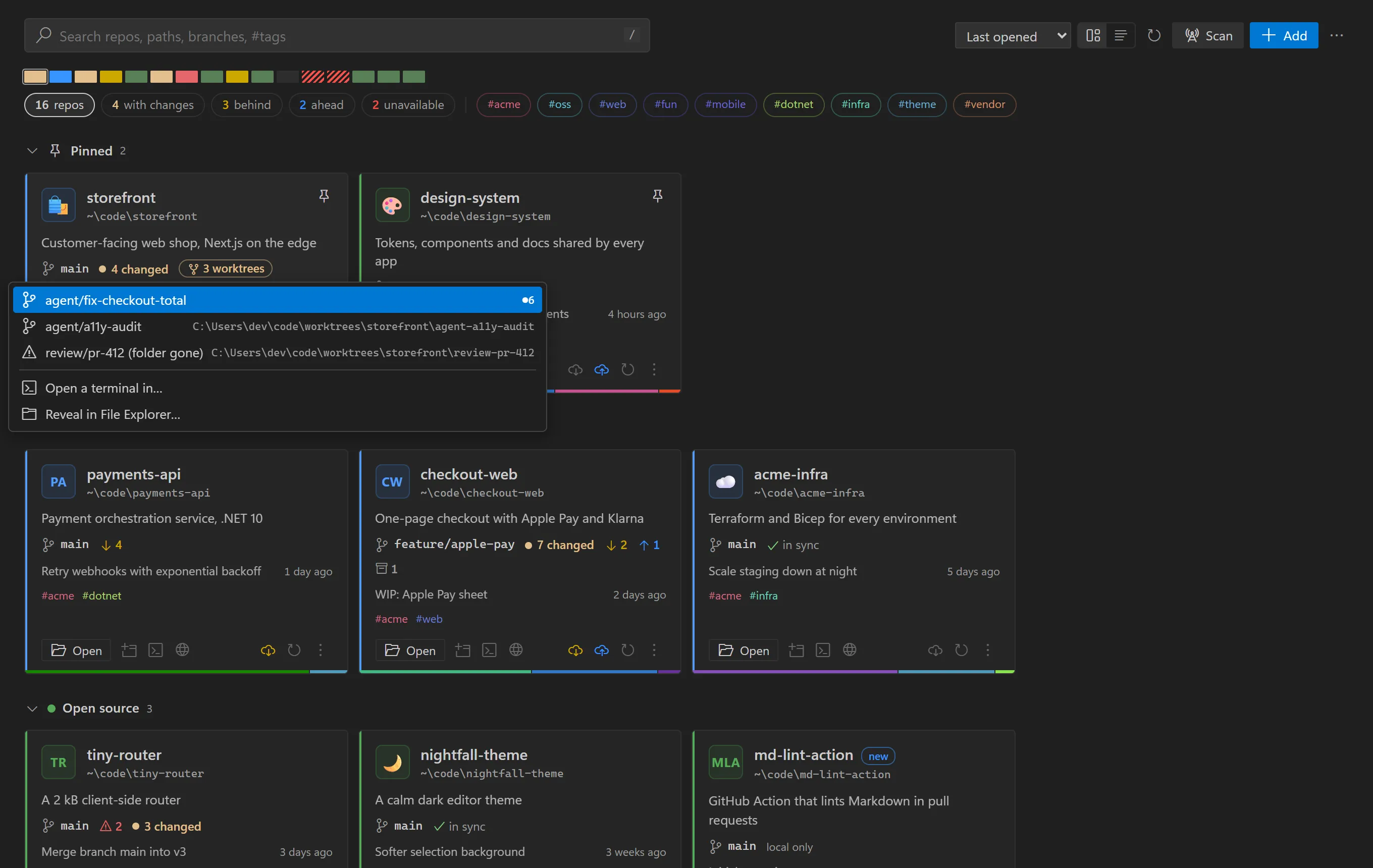
Agents spin up a git worktree for every task. Repo Board keeps them with their repo: a badge on the tile that turns yellow when one has uncommitted work.

Click it to see each worktree's branch and changes, open it, or open a terminal there. Folders that are gone get flagged.

A repo tile listing three agent worktrees and their branches

Jump to any repo in a keystroke.

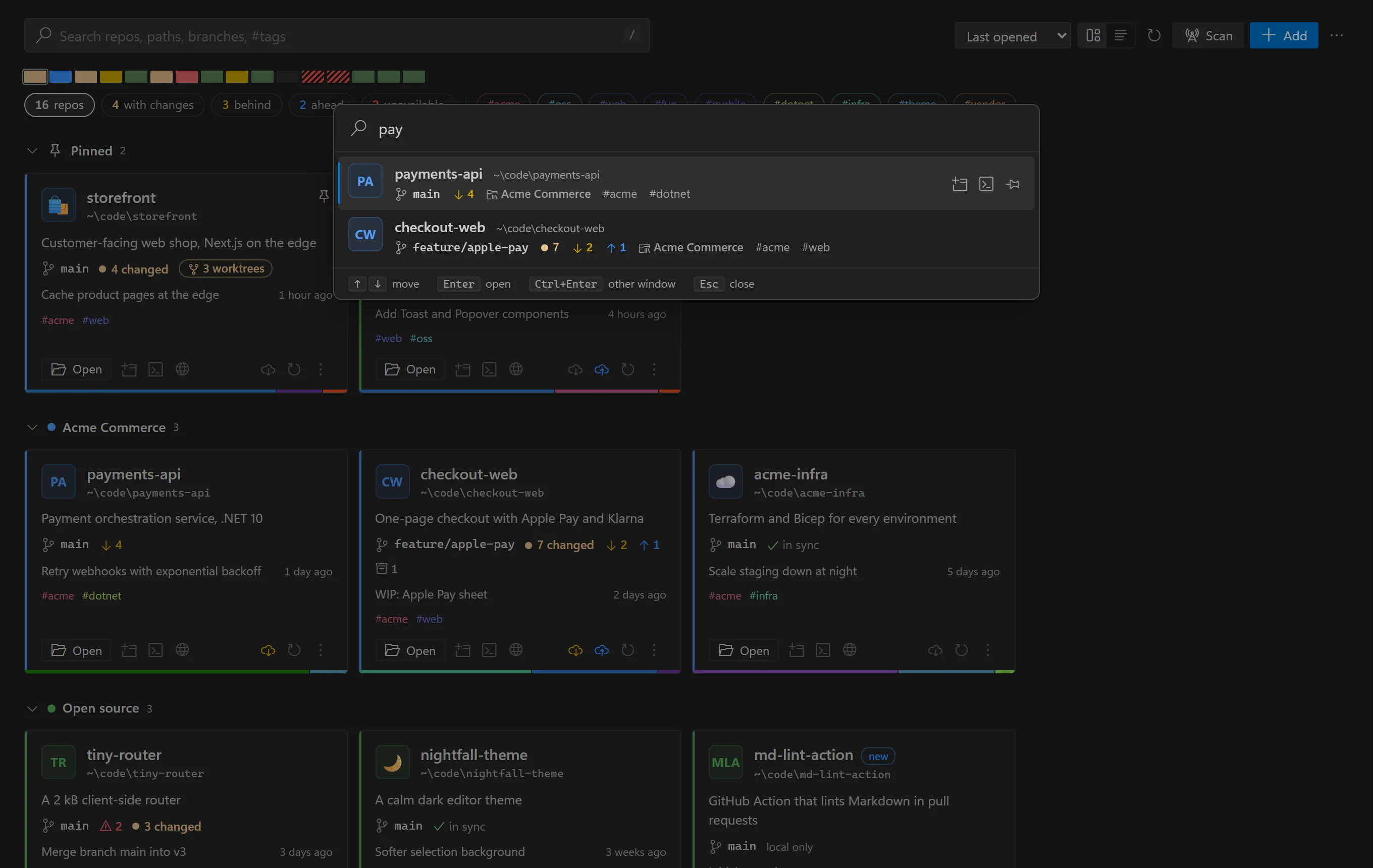
Press Ctrl Alt Shift P from anywhere, type a few letters of a name, path, branch or #tag, and press Enter. Pinned repos come first, then the ones you opened last.

The whole board is keyboard-driven: T opens a terminal, B the remote, F fetches.

The project switcher filtered to pay

Search that thinks like a developer.

Fuzzy on names, so chkweb finds checkout-web. It also matches paths, branches, languages and collections. Combine terms: #acme pay.

Pin favourites, group repos into coloured collections, add tags, icons and notes, or drag tiles into your own order.

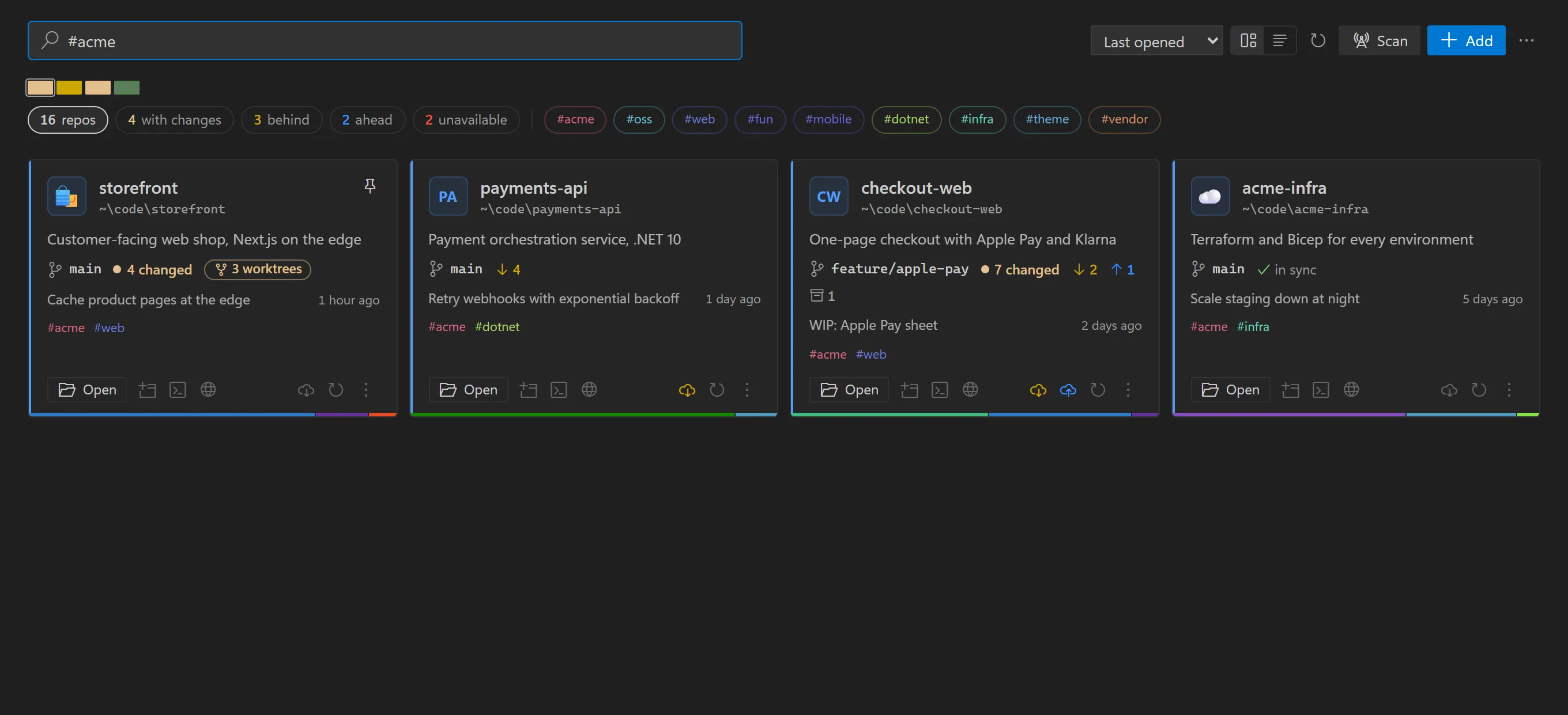
Board search filtered to the acme tag

Opens where you work.

One click opens a repo in your editor, a terminal in its folder, or its page on GitHub, GitLab or Azure DevOps.

  • VS Code
  • Cursor
  • Windsurf
  • Zed
  • VSCodium
  • Sublime Text
  • IntelliJ IDEA
  • VS Code Insiders
  • Windows Terminal
  • PowerShell
  • Terminal
  • iTerm
  • GNOME Terminal
  • Konsole
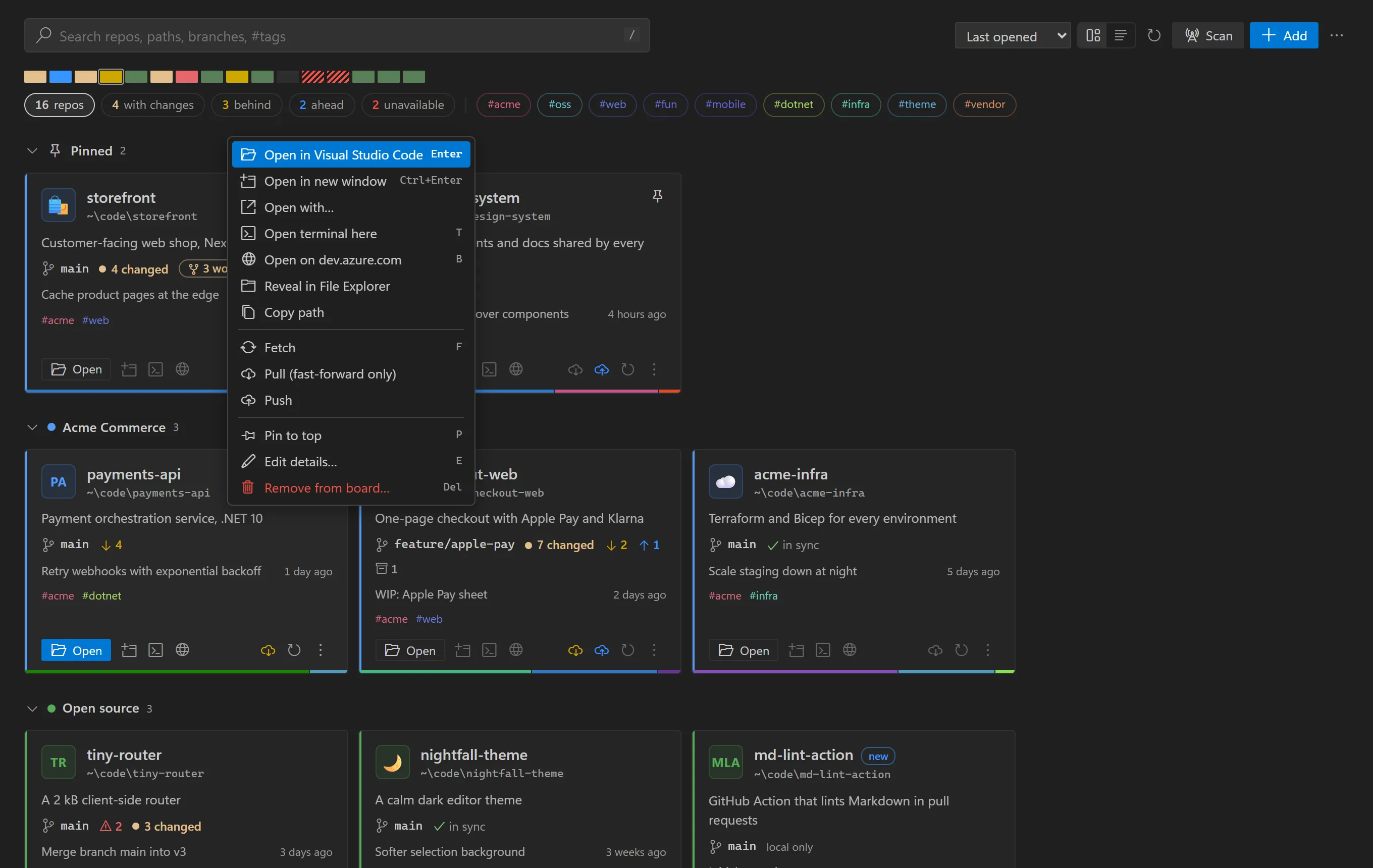
Context menu on a repo tile with open, terminal and browser actions

Fetch all. Pull all. Go.

Monday morning, 60 repos out of date. Pull all runs across every repo, four at a time. It is fast-forward only, so it never creates a merge, and repos with conflicts are skipped.

There is deliberately no push-all button.

One board, two homes.

Use the desktop app, the VS Code extension, or both. They read and write the same catalog.json, so pins, collections, tags and order stay in sync while both are open.

No telemetry. No account. No cloud.

Download Repo Board

Free and open source. The only requirement is git on your PATH.

Windows

Builds are not code-signed yet. If SmartScreen says “Windows protected your PC”, choose More info, then Run anyway.

macOS

If macOS reports the app as damaged, run this once:xattr -dr com.apple.quarantine "/Applications/Repo Board.app"

Linux

AppImage runs on most distributions. Use .deb on Debian and Ubuntu, .rpm on Fedora and openSUSE.

Live in VS Code? Get the extension from the Marketplace. Every release and its notes are on GitHub.

Questions

Is Repo Board free?

Yes. The desktop app and the VS Code extension are free and open source under the MIT license. There is no account and nothing to sign up for.

Does it scan my whole disk?

No. It only walks the scan folders you choose, to the depth you set (three levels by default), and stops at each repository it finds. It never follows symlinks or junctions and skips node_modules and similar folders.

Can I use the desktop app and the VS Code extension together?

Yes. Both read and write the same catalog.json, so pins, collections, tags and the order of your repos are shared, and a change made in one shows up in the other while both are running.

Does Repo Board send my data anywhere?

No. There is no telemetry, no account and no cloud service. The only network traffic is git talking to your own remotes, and the app asking GitHub whether a newer version exists.

Can Pull all break my branches?

Every pull is fast-forward only (git pull --ff-only), so it never creates a merge commit. Repos with conflicts are skipped, and there is no push-all button.

Which editors and terminals does it open?

VS Code, VS Code Insiders, Cursor, Windsurf, VSCodium, Zed, Sublime Text and IntelliJ IDEA, plus Windows Terminal, PowerShell, Terminal, iTerm, GNOME Terminal and Konsole. Anything else works through a custom command.

Why does Windows or macOS warn me when I install it?

The builds are not code-signed yet. On Windows, choose More info, then Run anyway. On macOS, if the app is reported as damaged, run xattr -dr com.apple.quarantine "/Applications/Repo Board.app" once.

What do I need installed?

Only git on your PATH. Repo Board runs on Windows, macOS (Apple silicon and Intel) and Linux (AppImage, .deb or .rpm).

Put every repo on one board.

Takes under a minute: install, pick the folder that holds your repos, done.